Real-time translation
Subtitles of what the other participants say, translated into your language as they speak.
 Vauta
Vauta
Free & open source · for Mac
Captures any call, transcribes it on your Mac and writes the minutes: decisions, tasks and open questions. No bot, no cloud, no account.
01
Your microphone is captured as Me and the call audio as Others. Works with any app; no bot joins the call.
Offers a notice to paste in the chat, so participants know.
Captures all system audio; tested in real calls in Safari so far.
02
Transcribed on your Mac, speaker by speaker. The minutes list decisions, tasks with owner and date, and open questions.
Every item has a source. Each decision and task quotes the transcript; anything it cannot back is marked unconfirmed.
03
Audio is never saved. Transcripts and minutes are encrypted, and the key stays in your Keychain.
Features
Subtitles of what the other participants say, translated into your language as they speak.
Tells voices apart automatically. Name a speaker once and the transcript and minutes use that name.
Type a few words during the call. Vauta writes the full note from what was said, with citations.
Every language Apple’s speech recognition supports. Minutes in the meeting’s language or yours.
Minutes and transcripts as Markdown, PDF, subtitles or JSON. Import audio or video recordings as meetings.
Apple Intelligence on your Mac, or your own model server at home or at work. Servers on the internet are refused.
Connected memory
Transcripts, minutes, notes and your PDF, Word, Excel and PowerPoint files, searched together.
With EmbeddingGemma 2 on your Mac, a question in English finds what was said in Spanish. Names, figures and codes still match exactly.
Vauta links the people, projects, clients and topics across your meetings, with one list of open tasks and their owners.
Who is coming, what the last meeting with them left open, and related meetings, documents and reminders. Each line opens its source.
After each meeting, reminders for open tasks and calendar events for agreed follow-ups. Nothing is added until you confirm.
The search model is optional: 574 MB, downloaded only when you choose. Without it, Ask searches by keywords.
The app

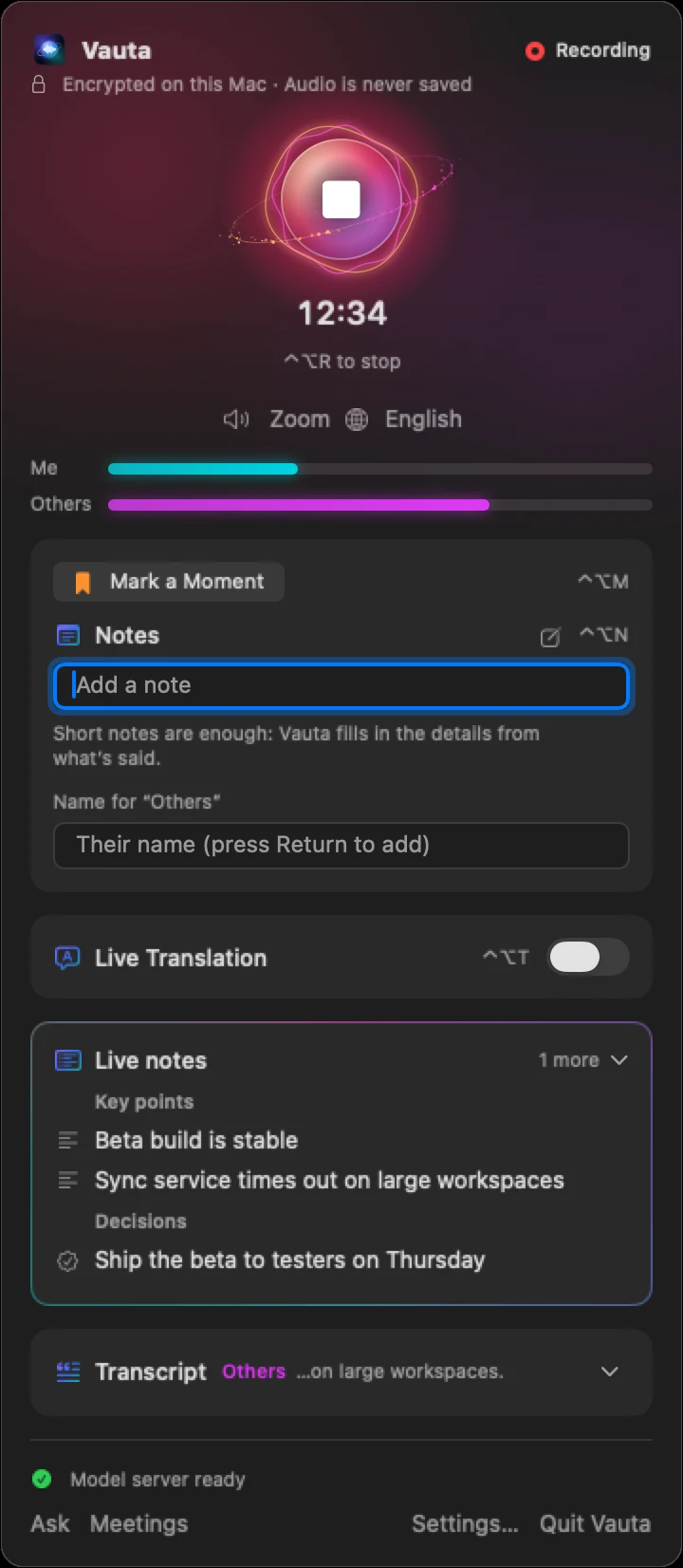
Real screenshots with invented sample meetings. Native Swift and SwiftUI.
Benchmarks
158×
faster than real time at telling speakers apart
110×
faster than real time, transcribing on device
Recorded test files on an M2
9.5%
speaker error rate (DER)
19 held-out English recordings
7.6%
word error rate in Spanish
Read speech, not conversation
1
network code path
Every request goes through it; a test enforces it
0
seconds of audio written to disk
Audio is transcribed in memory, then discarded
Apple M2, 24 GB, macOS 27, release build. Public corpora (AMI meetings, VoxConverse, Spanish parliament speech and audiobooks) built to resemble one side of a call — not real calls. Speaker figures score the remote speakers’ speech with a 0.25 s collar; settings were tuned on 18 other recordings (9.4% there). Method and limits →
Comparison
Sends your call’s audio to OpenAI to transcribe it, and needs a paid plan.
Vauta is ahead on 6 of 9 · level on 3
Meeting notes cost (Vauta ahead)
Vauta: Free
ChatGPT: Paid plan (Meetings: Pro or Business)
Open source (Vauta ahead)
Vauta: Yes, Apache-2.0
ChatGPT: No
Where your call is transcribed (Vauta ahead)
Vauta: On your Mac
ChatGPT: OpenAI’s cloud
Account (Vauta ahead)
Vauta: None
ChatGPT: OpenAI account
Run the AI on your own hardware (Vauta ahead)
Vauta: Yes: your Mac or your own server
ChatGPT: No
Your meetings train their AI (Vauta ahead)
Vauta: Never: nothing leaves your Mac or network
ChatGPT: Depends on your plan and settings
A bot in your call (Level)
Vauta: Never
ChatGPT: No bot
Works with (Level)
Vauta: Any call app on your Mac
ChatGPT: Any app, from its Mac app
Runs on (Level)
Vauta: Mac with Apple silicon
ChatGPT: Mac app only
Sources · ChatGPT: Meetings plugin · Record · Data controls
Full comparisons: ChatGPT · Gemini · Teams · Zoom · Otter · Fireflies · Granola · MacWhisper
Vendors’ public docs on 27–28 October 2026, for the feature named and its default settings. Plans change — check their sites. Names are trademarks of their owners; Vauta is not affiliated. Spotted an error?
FAQ
No. Vauta transcribes on your Mac with Apple’s speech recognition. The minutes are written by Apple Intelligence on your Mac, or by a model server you run on your Mac or your local network; servers on the internet are refused. The internet is used only to download a model, when you start the download.
No. Vauta captures the audio on your Mac: your microphone as Me and the call audio as Others. It offers a notice to paste in the chat so participants know they are being transcribed.
Macs with Apple silicon and macOS 26 or later. It captures any call app on the Mac, such as Zoom, Teams, Meet, FaceTime, Slack or Webex; so far it has been tested in real calls in Safari.
No. The audio is transcribed in memory and discarded. Transcripts and minutes are stored encrypted (AES-256) with the key in your Keychain, and transcripts are deleted after 90 days.
Every language Apple’s speech recognition supports on your macOS. Minutes are written in the meeting’s language or yours, and live subtitles can translate the other participants into your language.
Free and open source (Apache-2.0), with no account and no telemetry. You build it on your Mac from the source code with Apple’s Command Line Tools; Xcode and an Apple account are not needed. Version 0.9 is a public beta.
Yes, on a Mac with Apple silicon. Like them, it turns your calls into notes and minutes. Unlike them, it transcribes on your Mac, needs no account and is free; they also run on Windows or the web, and Vauta only on a Mac. The comparisons above link to each vendor’s own documentation.
Yes, once the models are on your Mac. Transcription uses Apple’s speech model, downloaded once per language, and the minutes are written by Apple Intelligence on your Mac or by your own model server on your network. The internet is needed only for those downloads.
Build it on your Mac with the commands below. Every line of code it runs is public.
$ git clone https://github.com/MaquinaTech/Vauta.git$ cd Vauta# once, recommended (asks for passwords)$ ./scripts/setup-signing.sh$ ./scripts/install.shNo Xcode, no Apple account, nothing prebuilt to trust.